HP 2023 Chromebook 14-Inch Review: The Best Budget Laptop?
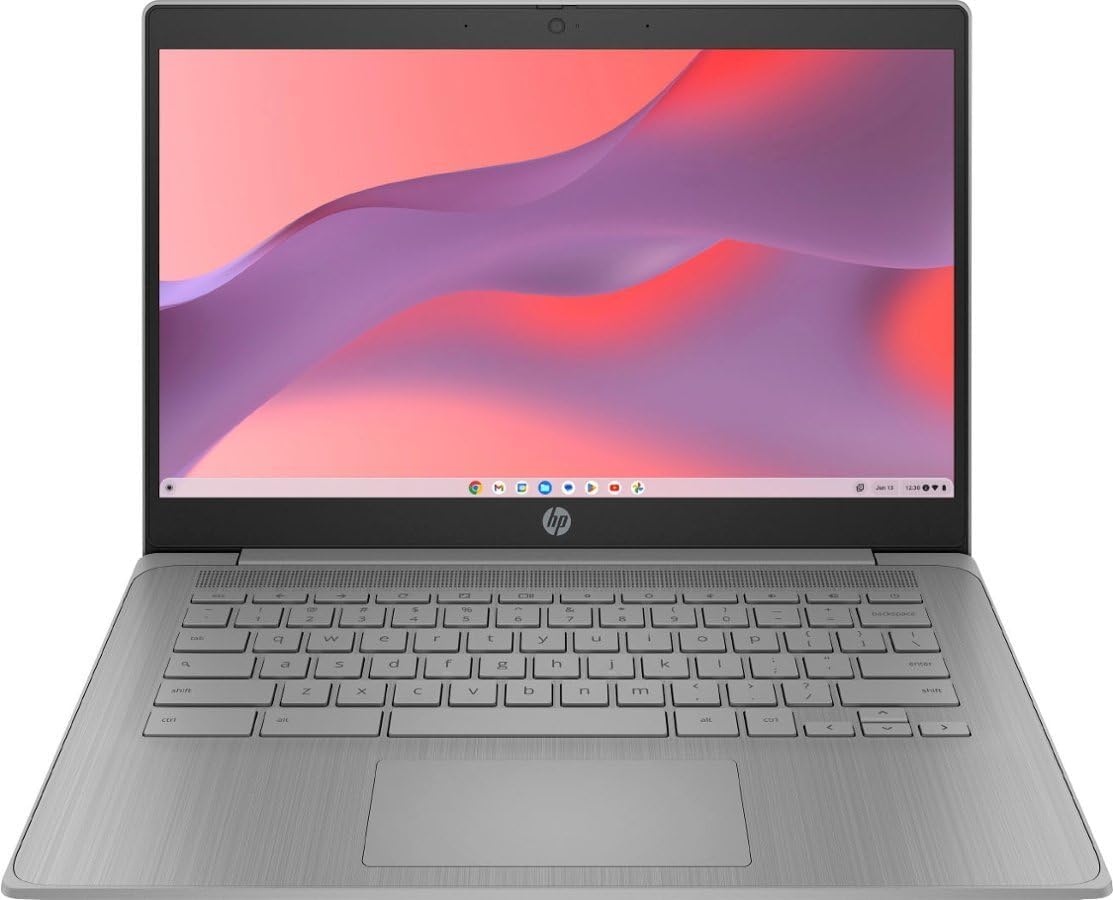
HP 2023 Chromebook 14-Inch Review: The Brutally Honest Truth About This Budget Laptop

Let’s be completely honest for a second: finding a good laptop under $300 is usually a nightmare. I remember buying a cheap Windows laptop a few years ago, and it took ten minutes just to open a web browser. It was incredibly frustrating. That is exactly why I decided to write this comprehensive HP 2023 Chromebook 14-Inch Review. I wanted to see if you can actually get a smooth, reliable laptop for the price of a few cups of premium coffee.
If you are a student, a parent looking for a laptop for your child, or someone who just wants to browse the internet without spending a fortune, you are in the right place. While we previously looked at more powerful machines in our Alienware 16 Aurora Review, today we are focusing entirely on extreme budget efficiency. Let’s dive deep into the design, battery life, and real-world performance of the HP 14-inch Chromebook.
Unboxing and First Impressions: Better Than Expected
When you first take the HP 2023 Chromebook out of the box, you might be genuinely surprised. Despite its low price tag, it does not feel like a cheap, hollow plastic toy. The “Modern Gray” finish gives it a sleek, professional, and minimalist look. Specifically, the matte texture on the lid does a fantastic job of hiding ugly fingerprints, which is a huge bonus if you carry it around all day.
Inside the box, you get the laptop itself, a compact USB-C charger, and the standard paperwork. There is no unnecessary clutter. This simplicity sets the tone for the entire Chrome OS experience: clean, straightforward, and ready to use in seconds.
Design and Portability: Your Back Will Thank You
If you are a college student walking across a massive campus, every pound in your backpack matters. Fortunately, the HP 2023 Chromebook is exceptionally lightweight, weighing in at just over 3 pounds (around 1.46 kg). Moreover, its slim profile means you can easily slide it in between heavy textbooks without any hassle.
Furthermore, the build quality is sturdy enough to survive the daily commute. While you shouldn’t drop it on a concrete floor, it feels rigid enough to handle the bumps and scrapes of being tossed into a school bag daily. Consequently, it has become a favorite among parents buying first laptops for their middle-schoolers.

Keyboard and Trackpad: A Writer’s Best Friend?
One of the most critical parts of any laptop is the keyboard. If you are typing a 5,000-word essay, a bad keyboard will ruin your day. During our HP 2023 Chromebook 14-Inch Review testing, the keyboard was a pleasant surprise. The keys have a satisfying travel distance and are well-spaced. You won’t find yourself accidentally hitting the wrong keys, which is a common issue on smaller 11-inch Chromebooks.
Additionally, the trackpad is large and responsive. It supports multi-touch gestures seamlessly. You can swipe with two fingers to scroll through long web pages or use three fingers to switch between open tabs. It is smooth and doesn’t have that “mushy” feeling found in older budget laptops.
Performance: What Can It Actually Do?
Now, let’s talk about the engine under the hood. This laptop is powered by an Intel Celeron N4120 processor and 4GB of RAM. If this were a Windows laptop, 4GB of RAM would be a disaster. However, because Chrome OS is incredibly lightweight, 4GB is more than enough for daily tasks.
In real-world usage, the laptop boots up from a completely powered-off state in less than 10 seconds. You can easily have 7 to 10 Chrome tabs open—including a YouTube video playing in the background, Google Docs, and your email—without experiencing major lag. However, you must manage your expectations strictly. This is not a machine for 4K video editing or heavy multitasking. It is built for the web, and it handles the web beautifully.
Display Quality: The Compromise
At this price point, manufacturers have to cut costs somewhere, and the display is usually the victim. The 14-inch screen features a 1366 x 768 HD resolution. To be perfectly honest, it is not the sharpest or brightest screen on the market. If you are used to a retina display on a MacBook, this will look a bit washed out.
However, it is not all bad news. HP included a fantastic anti-glare coating on the screen. Therefore, if you are sitting in a classroom with harsh fluorescent lights or working outside at a cafe, you won’t be blinded by reflections. For reading articles, typing documents, and casual Netflix streaming, the display certainly gets the job done.
Battery Life: Leave the Charger at Home
If there is one reason to buy a Chromebook over a cheap Windows PC, it is the battery life. During our tests, the HP 2023 Chromebook easily lasted between 10 to 12 hours on a single charge with moderate brightness. As a result, you can take it to school or work, use it all day, and still have enough juice left to watch a movie in bed at night. You can confidently leave the charging brick at home.
Storage and Connectivity
The laptop comes with 64GB of eMMC internal storage. While this sounds tiny, remember that Chrome OS is designed to be cloud-first. You are meant to save your files on Google Drive (and Google usually gives you 100GB of free cloud storage for a year when you buy a Chromebook).
Regarding ports, HP was very generous. You get:
- Two USB Type-C ports: Used for fast charging and fast data transfer.
- One standard USB Type-A port: Perfect for connecting an older wireless mouse or flash drive.
- A MicroSD Card Reader: A lifesaver if you want to cheaply expand the 64GB storage.
- A 3.5mm Headphone/Microphone Jack: Essential for wired headsets during Zoom calls.
Pros and Cons at a Glance
| What We Loved (Pros) | Things to Consider (Cons) |
|---|---|
| Incredible 10-12 hour battery life | Screen is only 1366×768 (Not Full HD) |
| Boots up in seconds and runs very smoothly | Small 64GB local storage capacity |
| Extremely lightweight and travel-friendly | Cannot install full Windows desktop apps |
| Excellent, tactile keyboard for long typing sessions | Not suitable for PC gaming or video editing |
Frequently Asked Questions (FAQs)
Q: Can I use Microsoft Word or Excel on this Chromebook?
A: You cannot install the heavy Windows desktop versions of Microsoft Office. However, you can easily use the web-based versions of Office 365, or download the Microsoft Office Android app directly from the Google Play Store.
Q: Is this laptop good for gaming?
A: If you want to play demanding PC games like Cyberpunk or Call of Duty, no. However, you can play thousands of Android games (like Roblox or Minecraft) from the Google Play Store, or use cloud gaming services like Xbox Cloud Gaming.
Q: Can I use it offline without an internet connection?
A: Yes! While Chromebooks are best used online, you can enable “Offline Mode” for Google Docs to write essays, and you can watch downloaded Netflix shows or listen to downloaded Spotify music when you don’t have WiFi.
Final Verdict: Should You Buy It?
To conclude this HP 2023 Chromebook 14-Inch Review, let’s answer the ultimate question: Is it worth your money? If you are a student writing papers, a parent looking for a secure laptop for kids, or someone who primarily uses Google Chrome and watches YouTube, the answer is an absolute Yes.
It saves you money, spares you the headache of Windows updates and viruses, and provides a battery that lasts all day. Ultimately, it delivers exactly what it promises: a fast, reliable, and secure web-browsing experience without breaking the bank.
Need a Reliable Laptop on a Budget?
Grab the HP 2023 Chromebook today and enjoy all-day battery life for work or school.





