HP 15 Review: Affordable Business Laptop with Windows 11
HP 15.6 Business Laptop Review
I have handled my fair share of budget-tier hardware, and the HP 15.6 Business Laptop lands exactly where you would expect for the price point. Pulling it out of the box, the first thing I noticed is the aggressive use of lightweight plastics. It feels hollow, bordering on fragile, which is common for this segment. The silver finish tries to mimic a premium aluminum aesthetic, but a quick tactile inspection confirms it is strictly polycarbonate. It is surprisingly light for its footprint, though I worry about the structural rigidity of the hinge over time.

The aesthetic is minimalist, almost to a fault. There is no flair here, just a standard chassis that sits flat on a desk. The keyboard deck shows some flex under moderate pressure, and the screen lid feels thin enough that I would hesitate to pack it into a crowded backpack without a hard-shell sleeve. It is a functional design that prioritizes cost-cutting over build prestige, which is a fair trade-off if the internal components were higher tier, but here, the chassis reflects the entry-level internals perfectly.
Display and Audio: The Bare Minimum
The display on this machine is, frankly, a relic. Sticking with a 1366 x 768 resolution in a modern era feels insulting, even for a budget laptop. When I put the screen to the test, the lack of pixel density is immediately apparent. Text is not as crisp as I demand, and high-resolution images look soft. The 250 nits of brightness struggle in anything but a dim room, and the viewing angles are poor; if you are not staring at the center of the panel, the colors shift drastically.

Audio is equally utilitarian. The stereo speakers are positioned in a way that suggests they are meant for basic video calls rather than media consumption. I found the sound output to be tinny, lacking any meaningful depth or bass response. At higher volumes, the chassis begins to vibrate, which introduces a subtle distortion that makes voices sound slightly metallic. If you plan on watching anything more complex than a YouTube lecture, do yourself a favor and keep headphones plugged into the jack at all times.
Real-World Performance and Bottlenecks
I pushed the Intel N100 processor through my standard suite of daily tasks, and the results were predictable. For light web browsing with a handful of tabs open, the system remains responsive enough for basic office work. However, as soon as I introduced more demanding applications, the limitations of the quad-core architecture became obvious. Multitasking is not this laptop’s strong suit; when background processes sync files or update Windows, the entire system experiences noticeable micro-stutters.
The storage configuration is a strange choice that I find baffling. While the RAM allows for a decent amount of open applications, the reliance on a small SSD means you will be relying heavily on cloud storage almost immediately. Software installations are slow compared to modern NVMe standards, and opening large documents reveals a hesitation in the system I cannot ignore. This is a machine built for single-purpose workflows; if you try to do too much at once, the CPU hits a wall and stops providing a fluid experience.

Battery, Thermals, and Connectivity
The battery life is serviceable, provided you keep your expectations grounded. During my testing, I found that the machine manages to get through a standard workday of light word processing, but the moment I increased screen brightness or jumped on a video call, the discharge rate spiked. It is certainly not a device you buy if you want to leave your charger at home for a long trip, as it barely survives a full day of mixed-use productivity.
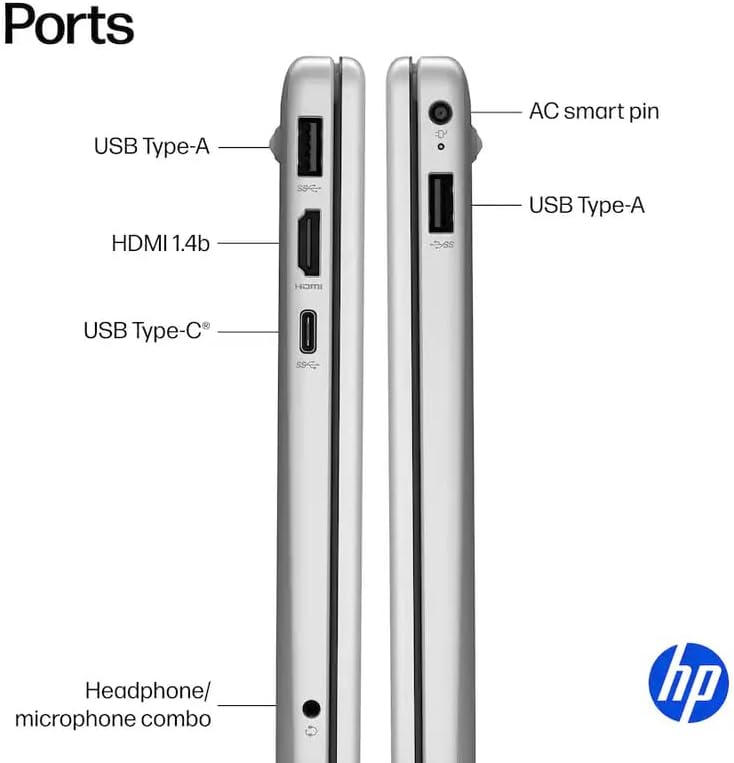
Thermals are surprisingly manageable, mostly because the N100 is a low-power chip that does not generate a massive amount of heat. The fan noise remains quiet even during heavy bursts of activity, though the underside of the chassis does get lukewarm after an hour of use. Regarding ports, the inclusion of USB-C is a plus, but the lack of Thunderbolt support limits what you can do with external displays. It covers the basics, but it is not a hub-ready device by any stretch of the imagination.
The Biggest Flaw
The fatal flaw of this HP 15.6 Business Laptop is the display panel. Manufacturers often hope buyers will ignore the screen resolution in favor of the CPU or RAM claims, but the user experience is defined by what you see. A 768p screen is simply not acceptable for productivity in the current market. It limits how much information you can fit on a page, forcing excessive scrolling and making split-screen multitasking nearly impossible.
Beyond the screen, the reliance on a low-end processor means that while the laptop works fine today, it has a very short runway for relevance. As web standards and background system processes grow more demanding, the hardware will struggle to keep up. It is a budget device that will feel sluggish much faster than a mid-tier alternative, effectively shortening the lifespan of your investment through sheer lack of computational overhead.
Target Audience and Final Verdict
This laptop is for students on a strict budget, or small business owners who only need a machine for simple, browser-based administrative work. If you are a designer, a developer, or anyone who spends more than three hours a day staring at a screen, stay far away from this device. The strain of the low-resolution display and the sluggishness of the processor under load will actively hinder your ability to get work done.
I would also advise against this for anyone looking for a long-term device. If you want a laptop that will still feel snappy in three years, you need to look at higher-tier processors and a display that meets the minimum 1080p standard. Do not be fooled by the high RAM count; RAM cannot make up for a weak CPU, and this machine will inevitably bottleneck long before your software needs evolve.
How It Stacks Up Against Competition
When comparing this machine to other entry-level options on the market, it becomes clear that HP is playing a volume game rather than a quality game. Many competitors at this price point offer similar plastic chassis, but several manage to include 1080p panels, which is a massive upgrade over the screen found here. I find that while the port selection is adequate, the lack of a higher-quality display makes it hard to recommend against those alternatives.
| Feature | HP 15.6″ Business Laptop | Acer Aspire 3 |
|---|---|---|
| Processor | Intel N100 | Intel N100 |
| RAM | 32GB | 8GB |
| Storage | 128GB SSD | 256GB SSD |
| Estimated Price | Check Latest Price | Check Latest Price |
The Final Verdict
The HP 15.6 Business Laptop is a device that does exactly what it says on the box, but nothing more. It is a tool for the most basic tasks, hampered by a display that belongs in the last decade. While the inclusion of a numeric keypad and a privacy shutter are nice touches for a business-oriented user, they do not make up for the lack of raw performance or screen clarity. If you can stretch your budget even slightly, you will find far better value elsewhere.
|
|





